Videoconsulta en Fraternidad-Muprespa
Fraternidad-Muprespa puede ofrecer a sus pacientes la posibilidad de realizar consultas con profesionales sanitarios a través de nuestra plataforma de videoconsulta, en aquellas situaciones que cumplan los requisitos necesarios establecidos por la Mutua.
Las videoconsultas se llevan a cabo a través del Portal del Paciente de Fraternidad-Muprespa o a través de la aplicación para dispositivos móviles My Frater Patient.
Los pacientes que hayan sido citados a una videoconsulta deben tener en cuenta las siguientes recomendaciones e indicaciones para la realización de la consulta:
Verifique su acceso al portal del paciente
Para poder realizar la videoconsulta, el paciente debe disponer de usuario activo del Portal del Paciente y de la aplicación Mi Frater Paciente. Es necesario que antes de la fecha de la videoconsulta, con antelación suficiente, el paciente se asegure de que puede acceder con su usuario al Portal o a la App y verifique que la cita de videoconsulta aparece en el apartado de “Próximas citas”.
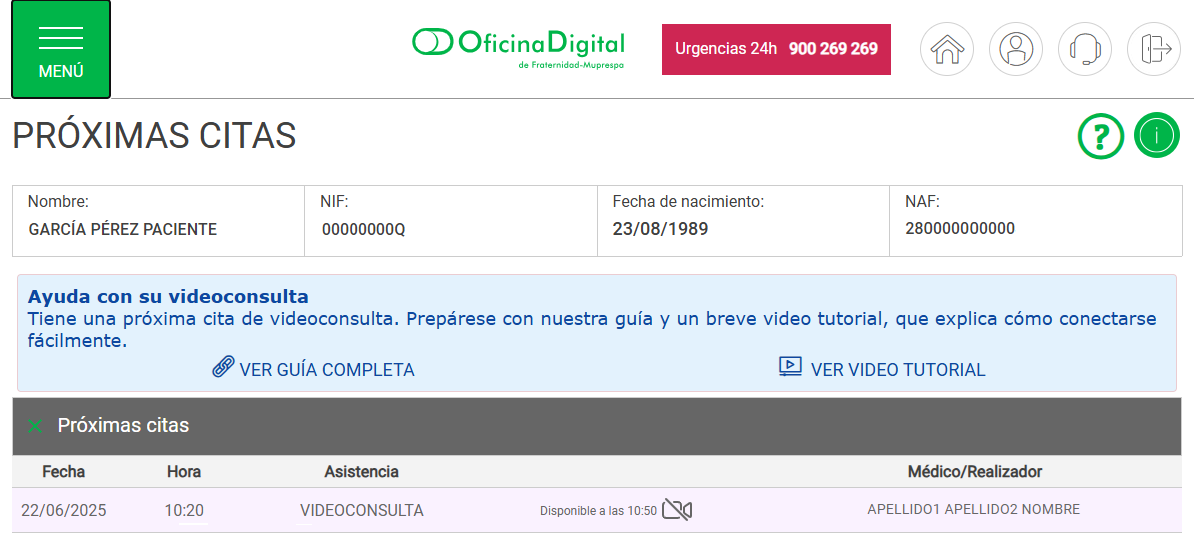
Ejemplo: verificación próxima cita (Portal del paciente)
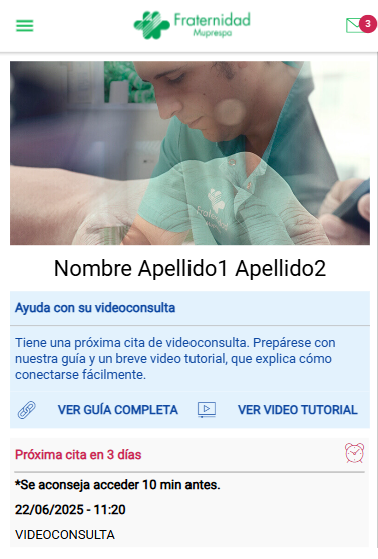
Ejemplo: verificación próxima cita (App Mi Frater Paciente)
En caso de que el paciente tuviera problemas para activar el usuario, no consiguiera acceder al Portal del Paciente o a la App Mi Frater Paciente, no visualizara la cita de videoconsulta en la plataforma, o encontrara cualquier otra incidencia que pudiera impedir el acceso a la sesión el día de la videoconsulta, por favor contacte cuanto antes con nuestro servicio de atención y soporte al usuario para que podamos ayudarle.
Si el paciente no dispone de usuario, lo puede activar de forma inmediata cumplimentando el formulario de solicitud de acceso en la propia aplicación (Acceder a “Iniciar sesión” y “Solicitar usuario”). Es recomendable que esta activación se realice con antelación suficiente al día de la consulta.
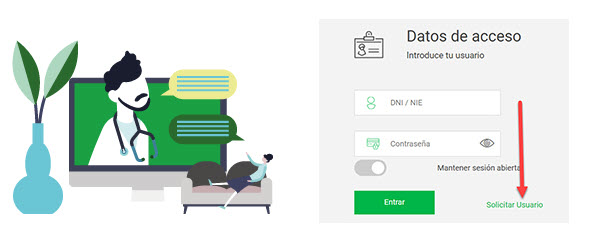
Ejemplo: solicitar usuario para acceder al portal del paciente
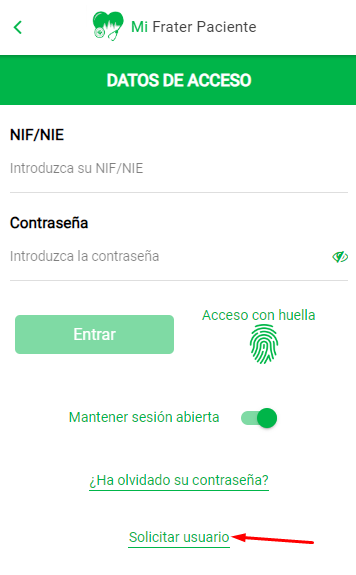
Ejemplo: solicitar usuario para acceder a la App Mi Frater Paciente
Navegador de Internet
La plataforma de videoconsulta usará el navegador de Internet predeterminado en su dispositivo. Para que la videoconsulta pueda desarrollarse adecuadamente, es necesario que el navegador de Internet sea compatible con la plataforma. Por favor, asegúrese de que el navegador predeterminado de su dispositivo está actualizado y es uno de los siguientes:
- Google Chrome
- Microsoft Edge
- Mozilla Firefox
- Opera
- Brave
- Safari
Prepare su entorno
Elija un lugar tranquilo y bien iluminado para realizar la videoconsulta. El lugar debe estar libre de ruidos o distracciones. La luz debe ser suficiente para que el profesional sanitario pueda visualizar al paciente correctamente.

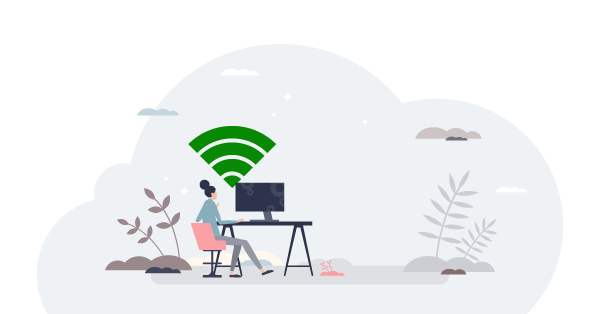
Asegure una conexión de Internet estable
Preferentemente, recomendamos utilizar Wi-Fi o una red de datos confiable para evitar interrupciones.
Verifique su dispositivo
Puede realizar la videoconsulta desde cualquier dispositivo con acceso a Internet que cuente con cámara y micrófono (teléfono móvil, tableta u ordenador). La plataforma de videoconsulta de Fraternidad-Muprespa incluye un asistente online con el que verificaremos el correcto funcionamiento de sus dispositivos, pero es recomendable que el paciente se asegure de que cámara y micrófono funcionan adecuadamente, por ejemplo realizando una videollamada de prueba antes de la consulta. También se recomienda verificar que su dispositivo tenga suficiente carga de batería para evitar que la sesión se interrumpa por falta de energía.
Conéctese a tiempo
Inicie la sesión con antelación, conectándose unos minutos antes para verificar que todo esté en orden y preparado para la llamada.

Prepare sus documentos
Si dispone de algún informe médico, resultado de análisis o estudios previos que puedan ser relevantes para que el profesional sanitario disponga de toda la información de su proceso médico. A través de la plataforma podrá hacer llegar sus documentos al profesional sanitario.

Acceso a la videoconsulta
El día programado para la videoconsulta podrá acceder a la plataforma desde nuestro Portal del Paciente o desde la aplicación para dispositivos móviles Mi Frater Paciente. El acceso a la plataforma de videoconsulta estará disponible desde 30 minutos antes de la hora programada, para que pueda acceder con antelación. El acceso estará visible en la pantalla principal del Portal del Paciente y de Mi Frater Paciente, para que no tenga ninguna dificultad para entrar.
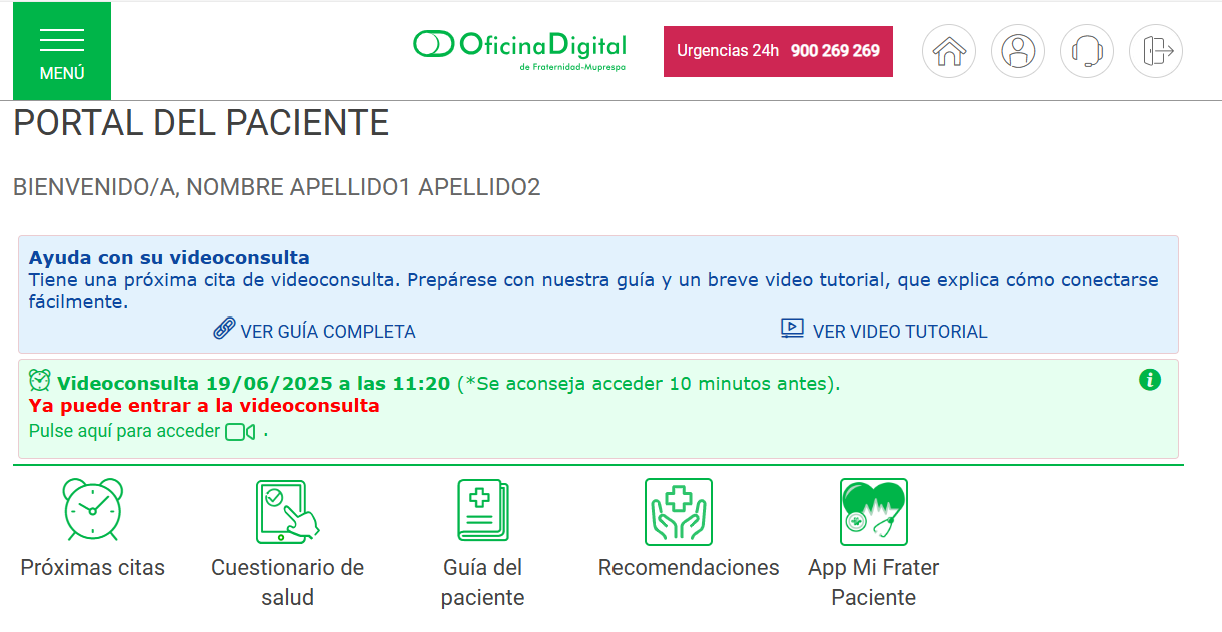
Ejemplo: Acceso desde el portal del paciente
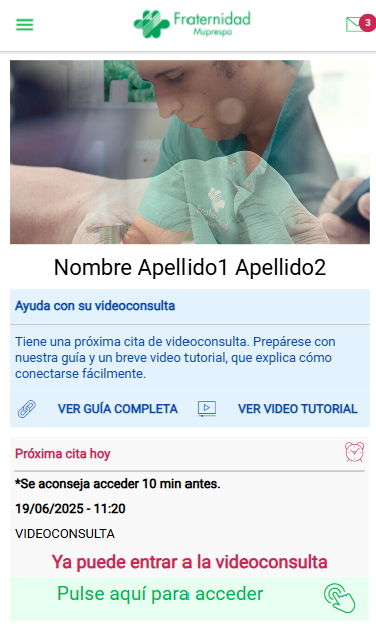
Ejemplo: Acceso desde la App Mi Frater Paciente
Hemos elaborado un breve video-tutorial que explica paso a paso cómo conectarse fácilmente a su videoconsulta. Si lo desea, puede visualizar el tutorial de acceso desde la App Mi Frater Paciente o el tutorial que explica cómo acceder desde el Portal de Paciente de Fraternidad-Muprespa.
Use nuestro servicio de atención y soporte al usuario ante cualquier problema
Fraternidad-Muprespa pone a disposición de los pacientes un servicio de soporte, con el que podrán contactar por distintos canales, para recibir atención ante cualquier problema o dificultad que se produzca antes, durante o después de la videoconsulta.